

I completed an offer, but I didn’t receive the coins?
Offerwalls are third-party services. We do not control the contents or tasks available on offerwall pages, and as such, we cannot influence the payout process. However, before carrying out any offerwall task, please carefully read and follow the instructions provided to complete the task. Some offers (eg. games) do include time requirements. That is, you must attain a specific level or complete the game within the alotted timeframe, if not you may lose out on the reward even if you eventually fulfill all conditions.For Surveys, answer honestly — there are no right or wrong answers. If you don’t qualify, try another one if available. It might be you are not the target audience/participant the offer provider is looking for at that time or the needed quota for respondents had already been met . Do not try to cheat or give gibberish answers. There are checks put in place by the offerwall services/survey providers to analyze your answers. You will not receive your reward if you try to cheat or supply gibberish answers.
The survey screen said ‘Successful/Completed’ at the end, but…
In a case where you complete an offer/survey correctly and successfully, yet you do not receive the reward, please take note of the following:1
Check 'Release Time' applicable for your Account
The release time for a reward is dependent on the Level of your account. If the reward for a task/offer/survey is above 500 Coins, it will be held/pending for a specific period before being credited to your account. This is shown in the table below:
A task/offer/survey reward less than 500 Coins will be instantly added to your account irrespective of your level. If the reward is 500 Coins or more, attaining Level 10 or higher grants you instant reward without having to wait or having your reward held/pending .
Note: This table/information can always be viewed by clicking the ‘About’ button on the Trust Score card
2
Refresh your Dashboard & Check Notifications
You may have to refresh your dashboard page to see updated information regarding your reward — the offerwall you completed the task on; the reward amount & a countdown for how long it will be held/pending by our security system (remember, this countdown which signifies the release time can vary depending on your Level, as explained in the table above)Arrows on the dashboard notification can be used to circle through information for multiple pending rewards. The total held/pending coins amount can be seen in bracket at your Coins Balance at the top.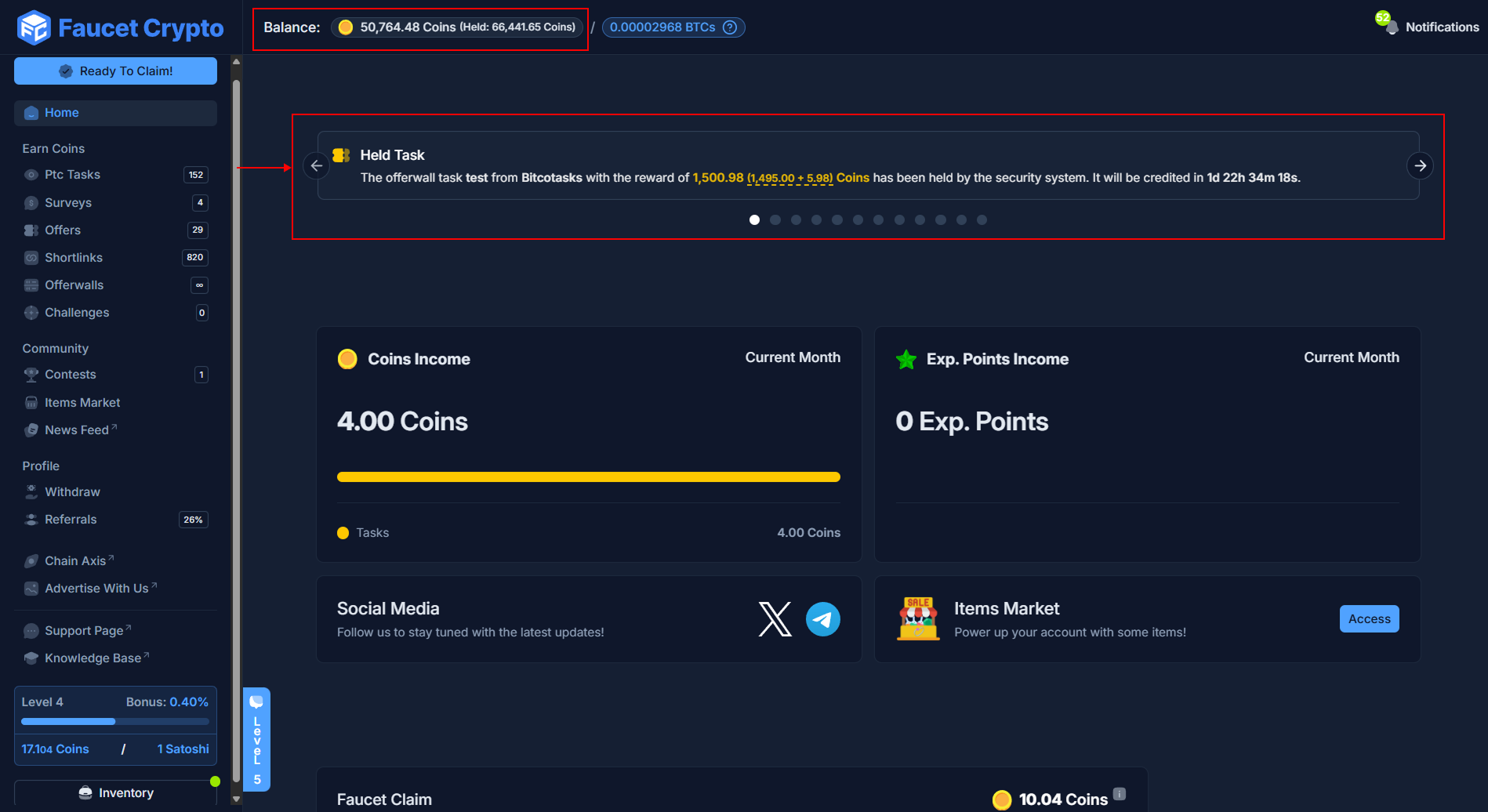
3
Cross-check within the Offerwall
If after confirming the above information yet you can’t find anything, cross-check and confirm that the task/offer/survey was actually recorded as ‘Successful, Completed or Finished’ in your profile on the Offerwall provider’s platform, and locate the contact section of the provider in order to get in touch with their support team to look into your case/payment.
Tip: It is important that you keep a screenshot of any offer you may have completed as you may be required to provide proof of completion when applying for your case/payment to be looked into.